# 模块四:协作篇 — Gateway、Profile、Delegation、Kanban 与高级特性
# 目录
# 1. Gateway 消息网关
官方文档:https://hermes-agent.nousresearch.com/docs/user-guide/messaging/
Gateway 是 Hermes 的消息平台接入层,可以作为前台进程或后台服务运行。它负责连接 Telegram、Discord、Slack、微信等平台,接收消息,维护每个聊天对应的会话,把消息转发给 Hermes Agent 处理,再把回复发回原平台。
Gateway 和 CLI 模式使用同一套 Hermes 程序、配置、会话、记忆、技能和工具。区别在于:CLI 是终端里的单次交互入口,Gateway 是长期运行的消息平台适配进程。Gateway 还会运行 cron 调度循环,用来触发到期的计划任务。
# 1.1 命令
hermes gateway setup # 交互式配置消息平台 | |
hermes gateway # 前台启动 Gateway | |
hermes gateway install # 安装为用户服务(Linux)/launchd 服务(macOS) | |
sudo hermes gateway install --system # 仅 Linux:安装为开机启动的系统服务 | |
hermes gateway start # 启动默认服务 | |
hermes gateway stop # 停止默认服务 | |
hermes gateway status # 查看默认服务状态 | |
hermes gateway status --system # 仅 Linux:检查系统服务状态 |
# Telegram Bot 端到端搭建
以 Telegram 为例,完整的 Gateway 接入流程如下:
步骤 1:创建 Bot
在 Telegram 中搜索 @BotFather ,发送 /newbot ,按提示设置名称和用户名,获得 Bot Token(格式: 1234567890:ABCdefGHIjklMNOpqrsTUVwxyz )。
步骤 2:配置 Hermes
# 将 Bot Token 写入 .env | |
echo "TELEGRAM_BOT_TOKEN=1234567890:ABCdefGHIjklMNOpqrsTUVwxyz" >> ~/.hermes/.env | |
# 交互式配置 Gateway(Telegram 选项) | |
hermes gateway setup |
步骤 3:启动 Gateway
# 前台运行(调试用) | |
hermes gateway | |
# 安装为系统服务(推荐生产环境) | |
hermes gateway install | |
hermes gateway start |
步骤 4:验证配对
首次与 Bot 私信时,Bot 会回复配对码。管理员在本机批准:
hermes pairing list # 查看待审批的配对请求 | |
hermes pairing approve telegram XKGH5N7P |
此后该用户即可与 Hermes 自由对话。
# 1.2 支持的消息平台(23+)
Hermes Gateway 支持 23 个以上的消息平台:
Telegram、Discord、Slack、WhatsApp、Signal、DingTalk、SMS (Twilio)、Mattermost、Matrix、Webhook、Email (IMAP/SMTP)、Home Assistant、Feishu/Lark、WeCom、Weixin(微信)、BlueBubbles (iMessage)、QQBot、Yuanbao、IRC、Microsoft Teams、Google Chat、LINE、SimpleX Chat、ntfy(v0.15+,无需账号的推送通知)
#邮箱配置  .env
EMAIL_PASSWORD=QHaqxxxxxxxxxxxxxxxxxxxxx
EMAIL_IMAP_HOST=imap.163.com
EMAIL_SMTP_HOST=smtp.163.com
EMAIL_SMTP_PORT=465
EMAIL_ADDRESS=yaohm7788@163.com
# Allow all users for testing
EMAIL_ALLOW_ALL_USERS=true

#微信配置 https://hermes-agent.nousresearch.com/docs/zh-Hans/user-guide/messaging/weixin
WEIXIN_ACCOUNT_ID=c94b6aa27d45@im.bot
WEIXIN_TOKEN=c94b6aa27d45@im.bot:06xxxxxxxxxxxxxxxxxxxxx
WEIXIN_BASE_URL=https://ilinkai.weixin.qq.com
WEIXIN_CDN_BASE_URL=https://novac2c.cdn.weixin.qq.com/c2c
WEIXIN_DM_POLICY=pairing
WEIXIN_ALLOW_ALL_USERS=true
WEIXIN_ALLOWED_USERS=
WEIXIN_GROUP_POLICY=disabled
WEIXIN_GROUP_ALLOWED_USERS=
WEIXIN_HOME_CHANNEL=o9cq800SHCEm-xxxxxxxxxxxxxxxxxxxxx@im.wechat
# 1.3 网关配对
默认情况下,网关会拒绝所有不在允许列表中或未通过私信配对的用户。
# 允许列表
在 ~/.hermes/.env 中配置:
# 按平台限制用户 | |
TELEGRAM_ALLOWED_USERS=123456789,987654321 | |
WEIXIN_ALLOWED_USERS=123456789,987654321 | |
# 或配置通用允许列表 | |
GATEWAY_ALLOWED_USERS=123456789,987654321 | |
# 显式允许所有用户(不推荐给有终端访问权限的机器人使用) | |
GATEWAY_ALLOW_ALL_USERS=true |
# 私信配对
无需手动配置用户 ID,未知用户在私信机器人时会收到一次性配对码,例如 Pairing code: XKGH5N7P 。之后管理员在本机批准:
hermes pairing approve telegram XKGH5N7P # 批准配对 | |
hermes pairing list # 查看配对列表 | |
hermes pairing revoke telegram <user_id> # 撤销配对 |
配对码 1 小时后过期,有速率限制,并使用加密随机数生成。
# 斜杠命令权限控制
权限分层只控制斜杠命令,不影响普通聊天。规则:
- 先判断用户是否被允许使用 Gateway
- 再判断当前作用域是否启用了命令权限分层
- 未配置 admin 列表时,所有已允许用户都可以运行斜杠命令
- 配置了 admin 列表时,管理员可运行所有命令,普通用户只能运行显式允许的命令(以及始终可用的
/help和/whoami)
# ~/.hermes/config.yaml | |
gateway: | |
platforms: | |
discord: | |
extra: | |
allow_from: ["111", "222", "333"] | |
allow_admin_from: ["111"] | |
user_allowed_commands: [status, model] | |
group_allow_admin_from: ["111"] | |
group_user_allowed_commands: [status] |
用 /whoami 查看当前平台、作用域、权限层级和可运行的斜杠命令。
# 2. Profile 多实例
官方文档:https://hermes-agent.nousresearch.com/docs/user-guide/profiles
通过 Profile 运行多个独立的 Hermes Agent,每个 Agent 有独立的配置、会话、技能和记忆。
# 2.1 什么是 Profile
Profile 是一个独立的 Hermes home 目录。其中包含各自的 config.yaml 、 .env 、 SOUL.md 、记忆、会话、技能、cron 任务、状态数据库和 Gateway 状态。
通过 Profile 可以运行用于不同用途的 Agent 而不会混淆 Hermes 状态。
创建 Profile 后,Hermes 会自动生成同名命令别名。例如创建 coder 后,可以直接使用 coder chat 、 coder setup 、 coder gateway start ,本质上等价于 hermes -p coder ... 。
# 2.2 创建 Profile
hermes profile create coder # 创建空白 Profile,内置技能会初始化 | |
hermes profile create coder --description "负责阅读源码、实现已明确的代码修改、修复测试或构建问题、运行必要验证,并在完成后汇报改动、测试结果和剩余风险" | |
hermes profile create coder --clone # 克隆当前 Profile 的 config.yaml、.env、SOUL.md | |
hermes profile create backup --clone-all # 克隆完整状态 | |
hermes profile create coder --clone --clone-from backup # 从指定 Profile 克隆 | |
hermes profile describe coder --text "..." # 为 Profile 添加描述 @ | |
hermes profile describe coder --auto # 用辅助模型自动生成描述 | |
hermes profile delete coder # 删除 Profile |
# 2.3 使用 Profile
coder chat # 启动 coder profile 的交互式对话 | |
coder setup # 运行 coder profile 的配置向导 | |
coder gateway start # 启动 coder profile 的 Gateway 服务 | |
coder doctor # 检查 coder profile 的健康状态 | |
coder skills list # 查看已安装的 skills | |
coder config set model.default anthropic/claude-sonnet-4 # 修改默认模型 |
别名本质上等价于 hermes -p <name> 。也可以显式指定: hermes -p coder chat 。
设置默认 Profile:
hermes profile use coder # 默认使用 coder Profile | |
hermes profile use default # 恢复为 default |
# 2.4 工作原理
Profile 使用 HERMES_HOME 环境变量。运行 coder chat 时,包装脚本会在启动 Hermes 前设置 HERMES_HOME=~/.hermes/profiles/coder 。每个 Profile 都可以作为独立进程运行自己的 Gateway,拥有自己的 bot token。
# 3. Delegation 任务委派
官方文档:https://hermes-agent.nousresearch.com/docs/user-guide/features/delegation
Hermes 可以创建子 Agent 来处理独立的任务。子 Agent 有自己的对话和终端环境,互不干扰。
# 3.1 单任务与并行批量
单任务:
delegate_task( | |
goal="Debug why tests fail", | |
context="Error: assertion in test_foo.py line 42", | |
toolsets=["terminal", "file"], | |
) |
并行批量(默认最多 3 并发,可通过 max_concurrent_children 调高):
delegate_task(tasks=[ | |
{"goal": "Research topic A", "toolsets": ["web"]}, | |
{"goal": "Research topic B", "toolsets": ["web"]}, | |
{"goal": "Fix the build", "toolsets": ["terminal", "file"]}, | |
]) |
超过 max_concurrent_children 的批量请求会直接返回工具错误。结果按输入顺序排列。父 Agent 中断会传播到所有活跃子 Agent。
# 3.2 子 Agent 上下文
子 Agent 启动时拥有全新对话,不知道父会话之前的任何内容。唯一上下文来自接收的 goal 和 context 两个字段:
goal:任务目标(必填)context:完成目标所需的全部背景信息
子 Agent 完成后,只有结构化摘要回传到父会话,详细对话过程不保留,以此控制 token 开销。
# 3.3 工具集限制
| toolsets | 适用场景 |
|---|---|
["terminal", "file"] | 编码、调试、文件编辑 |
["web"] | 调研、查文档 |
["terminal", "file", "web"] | 全栈任务(默认) |
某些工具限制为子 Agent 无法使用:
| 工具 | 原因 |
|---|---|
delegation | 叶子节点禁止再次委派(orchestrator 保留) |
clarify | 子 Agent 不能与用户交互 |
memory | 不写入共享持久记忆 |
code_execution | 子 Agent 应逐步推理 |
send_message | 无跨平台副作用 |
# 3.4 嵌套委派与配置
默认委派是扁平的:父 Agent(深度 0)→ 子 Agent(深度 1,不可再委派)。如需多阶段工作流,需要如下配置:
| 配置项 | 作用 |
|---|---|
role | leaf 是叶子节点, orchestrator 申请保留委派能力 |
max_spawn_depth | 全局最大委派深度; 1 表示只允许一层叶子 Agent |
orchestrator_enabled | 嵌套委派总开关 |
# ~/.hermes/config.yaml | |
delegation: | |
max_concurrent_children: 3 | |
max_spawn_depth: 1 | |
orchestrator_enabled: true |
配置交互关系:
| 配置组合 | 结果 |
|---|---|
role="leaf" ,任意 max_spawn_depth | 子 Agent 是叶子节点,不能继续委派 |
role="orchestrator" , max_spawn_depth: 1 | 仍不能继续委派 |
role="orchestrator" , max_spawn_depth: 2 | 可以再委派一层叶子 Agent |
orchestrator_enabled: false | 全局禁用嵌套委派 |
# 4. Kanban 多 Agent 协作
- 官方文档:https://hermes-agent.nousresearch.com/docs/user-guide/features/kanban
- 架构 PDF:https://github.com/NousResearch/hermes-agent/blob/main/docs/hermes-kanban-v1-spec.pdf
Hermes Kanban 是一个多 Agent 协作层:一个可恢复、可审计、可中途介入的工作队列。它把任务、依赖、评论、运行记录和工作目录放进一个持久任务板里,让多个具名 profile 以异步方式协作。
# 4.1 从 delegate_task 到 Kanban
delegate_task 适合短的、自包含的推理子任务,但无法覆盖:
- 研究分流与综合:多个专家型 Agent 并行产出候选发现,一个或多个审查者选择、合并
- 定时循环工作流:日报、周报、小时级收件箱分流等会跨运行积累知识
- 数字分身 / 持久助手:具名、长期存在的 Agent 身份在数周或数月里积累记忆
- 端到端工程流水线:拆解、并行实现、审查、迭代、提交
Kanban 的目标就是补上这些能力,提供:跨运行持久状态、工作可见性、不同技能 Agent 之间的交接、人类或对等 Agent 随时介入。
# 4.2 架构
三层架构:
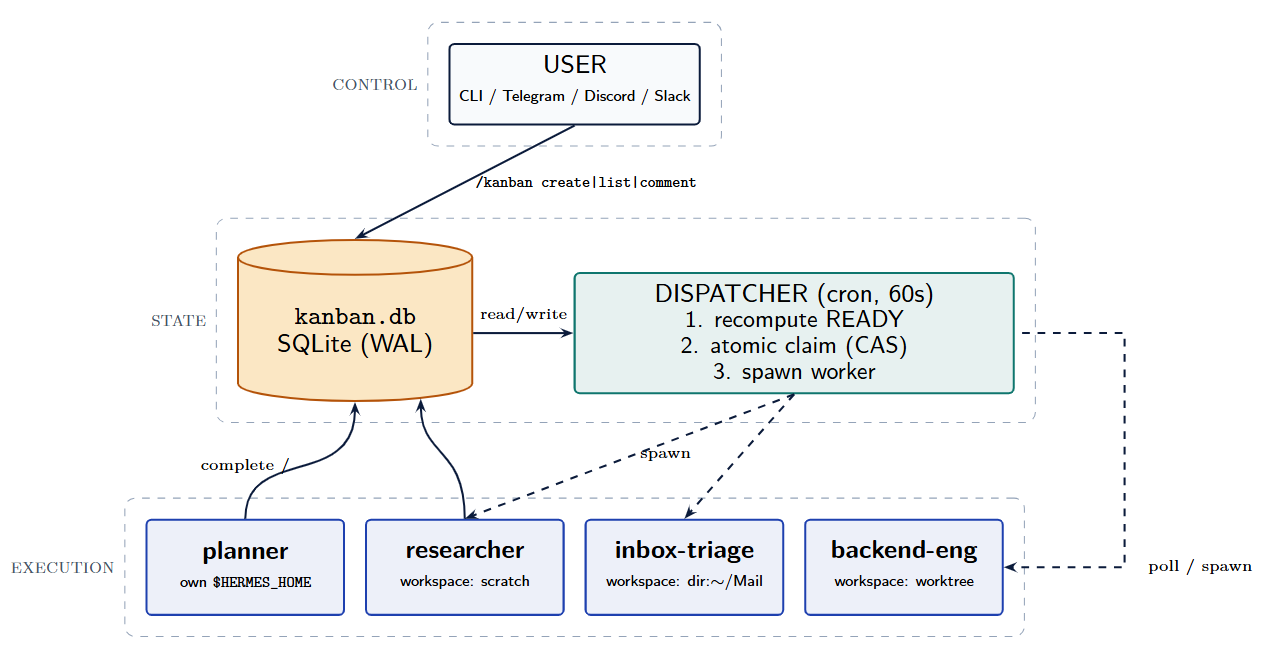
- Control Plane(控制层):CLI、Gateway、Dashboard — 用户交互入口
- State Plane(状态层):SQLite board + dispatcher — 唯一事实来源,决定哪些任务可运行
- Execution Plane(执行层):独立 profile worker 进程,每个都有隔离状态
所有协调都通过任务板流转,profile 之间没有直接的进程间通信。
# 4.3 核心概念
# Board(任务板)
Board 是一个独立的任务队列,拥有自己的 SQLite 数据库、workspaces 目录和调度循环。默认 board 数据库位于 ~/.hermes/kanban.db 。非默认 board 位于 ~/.hermes/kanban/boards/<slug>/ 。
# Task(任务)
Task 是 Kanban 的基本工作单元。一个 task 只有一个 assignee ,通常是 Hermes profile 名称。
Task 状态:
| 状态 | 说明 |
|---|---|
triage | 待分流 / 待明确 |
todo | 已创建但尚未满足运行条件 |
scheduled | 已暂缓调度,等待恢复 |
ready | 可以被 dispatcher 认领 |
running | worker 正在执行 |
blocked | 需要人工输入或等待外部条件 |
review | 等待审查 |
done | 已完成 |
archived | 已归档 |
Task 生命周期状态流转:
┌──────────────┐ | |
│ triage │ ← 粗略想法 / 高层目标 | |
└──────┬───────┘ | |
│ specify / decompose(自动或手动) | |
▼ | |
┌──────────────┐ | |
┌────│ todo │ ← 已创建,等待依赖满足 | |
│ └──────┬───────┘ | |
│ │ 所有父任务 done/archived | |
│ ▼ | |
│ ┌──────────────┐ | |
│ │ ready │ ← 可以被 dispatcher 认领 | |
│ └──────┬───────┘ | |
│ │ dispatcher atomic claim | |
│ ▼ | |
│ ┌──────────────┐ | |
│ │ running │ ← worker 进程中执行 | |
│ └──┬───┬───┬───┘ | |
│ │ │ │ | |
│ │ │ └──────────┐ | |
│ │ │ │ | |
│ ▼ ▼ ▼ | |
│ ┌────────┐ ┌────────┐ ┌──────────┐ | |
│ │ done │ │blocked │ │ crashed/ │ ← 自动恢复或超过重试上限 | |
│ └────────┘ └───┬────┘ │ timed_out│ 进入 blocked | |
│ ▲ │ └─────┬─────┘ | |
│ │ unblock(人工/自动化) │ | |
│ │ │ ┌────────┘ | |
│ │ ▼ ▼ | |
│ │ ┌──────────────┐ | |
│ └───│ ready │ ← 重新进入调度队列 | |
│ └──────────────┘ | |
│ | |
▼ | |
┌──────────────┐ | |
│ archived │ ← 归档(不再参与调度) | |
└──────────────┘ |
关键点:
triage是入口态,经过 decompose 拆解后变成todo子任务(原始 triage 变成 root task)todo→ready由 dispatcher 在每次 tick 中自动推进(检查依赖是否满足)ready→running通过 SQLite 原子 CAS 更新完成,保证并发安全running结束后进入done(正常完成)或blocked(需要人工介入)blocked经unblock后回到ready,重新进入调度队列- 崩溃 / 超时任务由 dispatcher 的 stale recovery 自动回收
关键字段包括 title 、 body 、 assignee 、 priority 、 workspace_kind 、 workspace_path 、 claim_lock 、 consecutive_failures 、 max_retries 等。
# Link(任务依赖)
Link 是 task 之间的父子依赖( parent_id -> child_id )。父任务完成之前,子任务保持在 todo ;所有父任务完成( done / archived )后,dispatcher 推进子任务到 ready 。支持 fan-out 和 fan-in。
# Comment(评论 / 交接记录)
Comment 是人类和 Agent 在 task 上追加的持久消息,也是 Kanban 的跨 Agent 交接协议。Worker 启动时会读取完整评论串。人类可通过评论补充要求,Agent 可留下中间发现或交接说明。
# Event(任务事件)
Event 是 Kanban 的审计日志,记录 task 生命周期里的状态变化、人工编辑和 worker 执行遥测。常见事件:
- 生命周期:
created、promoted、claimed、completed、blocked、unblocked、archived - 人工编辑:
assigned、edited、reprioritized、status - 遥测:
spawned、heartbeat、reclaimed、crashed、timed_out、stale、gave_up
# Workspace(工作目录)
Task 绑定的工作目录,worker 执行时所在位置。
scratch:默认模式,为 task 创建新的临时工作目录dir:<path>:使用已有绝对路径worktree:为代码任务创建 git worktree
# 4.4 协作模式
Kanban 可衍生出 6 种可重用协作模式:
| 模式 | 说明 | 典型场景 |
|---|---|---|
| Fan-out(扇出) | 一个目标拆成多个同级 task,并行执行 | 多角度研究、并行实现 |
| Pipeline(流水线) | 上游完成 → 下游启动,阶段式传递 | researcher → analyst → writer → reviewer |
| Fan-in(扇入) | 多个 task 汇总到一个聚合 task | 研究综合、方案评审 |
| Long-running journal | 同一 profile 通过定时任务在共享 workspace 反复处理 | 日报、周报、监控巡检 |
| Human-in-the-loop | worker 阻塞 → 人工评论 → unblock → 重新启动 | 不确定决策、需要审批 |
| Fleet farming | 一个 profile 管理 N 个对象,每个对象独立 workspace | 多账号管理、多服务器巡检 |
# 4.5 Dispatcher 调度器
Dispatcher 是一个长期循环,默认运行在 Gateway 内部。每 N 秒(默认 60 秒)扫描 board,执行四类动作:
- stale recovery:处理异常的
running任务(认领过期、进程退出、超时) - recompute ready:推进依赖满足的任务到
ready - atomic claim:通过 "比较并交换" 式 SQL 更新认领任务
- 启动 worker:认领成功后启动 assignee 对应的 profile worker
核心并发语义:
UPDATE tasks | |
SET status = 'running', | |
claim_lock = ?, | |
claim_expires = ? | |
WHERE id = ? | |
AND status = 'ready' | |
AND claim_lock IS NULL; |
更新命中 1 行 = 认领成功;命中 0 行 = 已被其他调度器认领。
失败与恢复:连续失败超过重试上限后,任务自动进入 blocked ,等待人类介入。
# 1. 初始化看板(如果还没创建)
hermes kanban init

# 2. 创建一条演示任务
hermes kanban create '阅读 Hermes Agent 文档并小结,永久保存到桌面' --body '重点看 agent loop、skills、gateway 三个部分' --assignee default

# 3. 查看任务
hermes kanban list

# 4. 看某条任务的详情
hermes kanban show <task_id>

# 5. Worker 认领任务(会打印工作目录)
hermes kanban claim <task_id>

# 6. 再启动task
hermes kanban unblock  <task_id>
# 4.6 Orchestrator Profile
Kanban 把编排分成两个阶段:
- Decomposer 处理
triagetask:判断目标是否需要拆分、创建子任务图、写入 assignee 和依赖关系 - Orchestrator profile 承接 root task:子任务完成后,汇总结果,判断总目标是否完成
Orchestrator profile 的职责是协调,不是执行。推荐约束:
- 禁用执行型工具:只保留
kanban、memory,必要时加messaging - 加载
kanban-orchestratorskill:注入 "你是编排者不是执行者" 的行为约束 - 基于真实 profile 路由:根据本机 profile 的 description 路由任务
创建 orchestrator profile:
hermes profile create orchestrator --clone \ | |
--description "Kanban 编排者。负责拆解高层目标、创建任务、指派真实存在的 profile、建立依赖关系、汇总下游结果;不直接执行研究、写作、编码或运维任务。" | |
orchestrator tools disable terminal file web browser code_execution | |
hermes config set kanban.orchestrator_profile orchestrator | |
hermes config set kanban.auto_decompose true |
# 4.7 Multi-Tenant Context
tenant 是 task 上的可选命名空间,让同一个 profile 服务多个业务上下文。
hermes kanban create "monthly report" \ | |
--assignee researcher \ | |
--tenant business-a \ | |
--workspace dir:/home/user/tenants/business-a/data/ |
Tenant 主要影响 Workspace、记忆(命名约定)、Board 过滤和审计。Tenant 是软隔离,不是安全边界。
# 4.8 命令工具
hermes kanban init # 幂等创建 kanban.db | |
hermes kanban create "research Hermes Agent" --assignee researcher | |
hermes kanban list [--mine] [--assignee P] [--status S] [--tenant T] | |
hermes kanban show <id> | |
hermes kanban assign <id> <profile> | |
hermes kanban link <parent_id> <child_id> | |
hermes kanban comment <id> "<text>" | |
hermes kanban complete <id> [--result "..."] [--summary "..."] | |
hermes kanban block <id> "<reason>" | |
hermes kanban unblock <id> | |
hermes kanban archive <id> | |
hermes kanban watch [--assignee P] [--kinds completed,blocked,...] | |
hermes kanban tail <id> | |
hermes kanban stats | |
hermes kanban dispatch [--dry-run] [--max N] | |
hermes kanban swarm <prompt> # v0.15+ | |
hermes kanban boards list | |
hermes kanban boards create <slug> --name "Display Name" | |
hermes kanban boards switch <slug> | |
hermes kanban boards rm <slug> # 归档 | |
hermes kanban boards rm <slug> --delete # 硬删除 | |
hermes kanban decompose <id> # 把 triage task 拆成子任务图 | |
hermes kanban specify <id> # 补全 triage task 成明确 spec | |
hermes kanban gc # 清理归档 task 的 scratch workspace |
所有命令也支持 /kanban 斜杠形式在会话内使用。
hermes kanban swarm "研究 Hermes Agent 的架构并写一份分析报告,输出到桌面" \
  --worker "default:Agent Loop 分析" \
  --worker "default:Skills 系统分析" \
  --worker "default:Gateway 架构分析" \
  --verifier default \
  --synthesizer default